Windows 10 Extended Security Updates: Consumer and Commercial Options
- Published
- Checked
- Sources
- 6 listed
- In short
- 3 key points
- By
- DevDiffs
Support for Windows 10 ended on October 14, 2025. Consumer Extended Security Updates keep eligible PCs receiving security updates through October 12, 2027. You can enroll at no additional cost by syncing your PC Settings, redeeming 1,000 Microsoft Rewards points, or paying a one-time $30 USD plus applicable tax.
In short3 key points
Key points
- Before enrolling a home PC, confirm it runs Windows 10 version 22H2 and install all Windows updates, including KB5126256.
- Enroll from Settings > Update & Security > Windows Update, and expect only critical and important security updates, with no feature updates or technical support.
- Consumer ESU is free through PC Settings sync or 1,000 Microsoft Rewards points, or costs a one-time $30 USD, and one license can cover up to 10 devices.
Full article: about 4 minutes
When Windows 10 support ends and what ESU covers
Support for Windows 10 ended on October 14, 2025. Consumer Extended Security Updates (ESU) keep eligible PCs receiving important security updates through October 12, 2027.
The official Windows lifecycle pages do not describe any other change to your PC on that date.
Which ESU options exist and what each one costs
| Option | Who it is for | Cost | Coverage end | Prerequisites and notes |
|---|---|---|---|---|
| Consumer ESU | Home, Pro, Pro Education and Workstations PCs on Windows 10 version 22H2 | No additional cost when syncing PC Settings, 1,000 Microsoft Rewards points, or a one-time $30 USD plus applicable tax | Through October 12, 2027 | Requires the KB5126256 preparation package and a non-child Microsoft account that is an administrator on the PC. Enroll from Settings > Update & Security > Windows Update. |
| Commercial volume licensing ESU | Organizations buying through Microsoft Volume Licensing | Year 1 is $61 per device, the price doubles each consecutive year, and Year 3 is $244 per device | Year 1 through Year 3, with Year 3 ending October 10, 2028 | Sold by the full year with a minimum of one license. Year 1 must be bought before Year 2. |
| Windows 365 and Azure virtual machines | Windows 365 Cloud PCs and Windows 10 virtual machines in Azure | No additional cost | The sources do not give an end date. | The user signs in with the same Entra ID account at least once every 22 days. |
The commercial prices and dates come from one technology website, not from a Microsoft page.
How a home user enrolls a consumer PC
- Confirm the PC runs Windows 10 version 22H2 in Home, Pro, Pro Education or Workstations edition.
- Install the Windows 10 ESU Licensing Preparation Package, KB5126256, which enrollment requires.
- Sign in with a Microsoft account that is not a child account and is an administrator on the PC.
Microsoft says to install all available Windows updates, including the preparation package, before you enroll from Windows Update and not through a web link.
The preparation package installs automatically through Windows Update after a security update on or after October 14, 2025. The device then restarts.
Settings › Update & Security › Windows Update › Enroll now

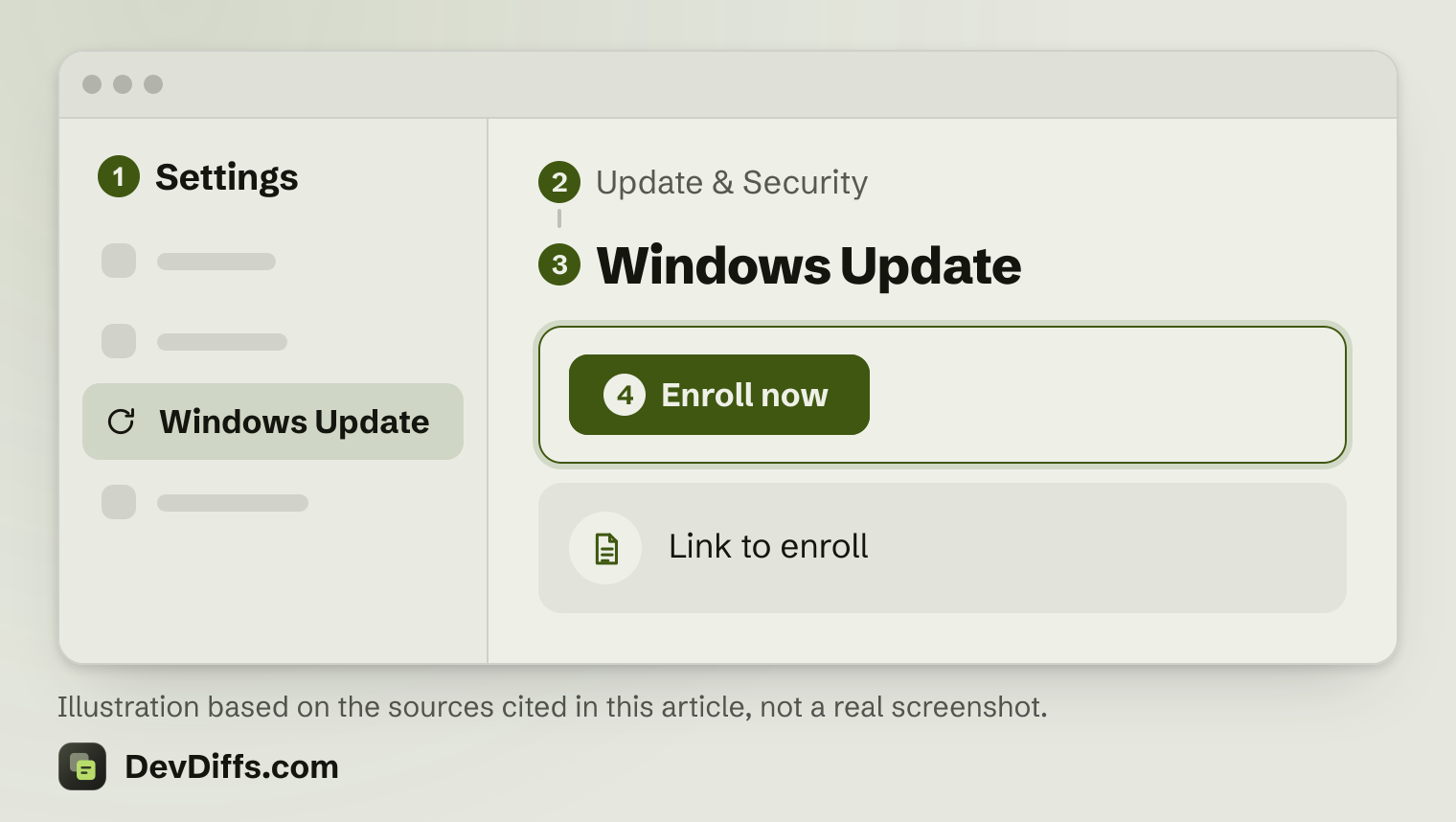
Once the requirements are met, the enrollment option appears automatically in Update & Security settings when it becomes available.
Microsoft is rolling out the enrollment wizard in phases to eligible devices worldwide. If you do not see the option yet, that rollout may be the reason.
Microsoft released KB5071959 to correct an issue that caused the consumer ESU wizard to fail.
An individual’s tutorial is offered as a workaround for enrollment problems. The source does not say whether Microsoft publishes it.
The official pages do not give steps for confirming that ESU is active after enrollment.
What consumer ESU costs and what it does not cover
You can enroll at no additional cost by syncing your PC Settings. You can also redeem 1,000 Microsoft Rewards points, or make a one-time purchase of $30 USD or the local currency equivalent plus applicable tax.
Enrollment options and timing may vary by region, such as in the European Economic Area, while updates are applied consistently across supported areas.
Rewards orders are final and not eligible for return or exchange.
An existing consumer ESU license can be used on up to 10 devices.
- Included: critical and important security updates only.
- Not included: new features, general fixes or feature improvements.
- Not included: technical support, apart from help with ESU license activation and installing ESU updates.
- Not included: devices in kiosk mode, and devices managed by an organization or enrolled in enterprise licensing programs.
Microsoft says the consumer program can’t be used in commercial scenarios. Microsoft Entra registered devices remain eligible.
Business options: commercial ESU and cloud PCs
Commercial ESU is bought through Microsoft Volume Licensing by the full year, with a minimum of one license. Year 1 must be bought before Year 2.
The Year 1 price is $61 per device, and the price doubles every consecutive year. Year 2 coverage runs from October 14, 2026 to October 12, 2027.
Year 3 costs $244 per device and ends on October 10, 2028.
Commercial ESU gives critical and important security updates only. It has no new features, no non-security fixes and no general technical support.
Windows 365 Cloud PCs and Windows 10 virtual machines in Azure receive ESU with no added charge.
Microsoft 365 Apps security updates on Windows 10 continue for three years after Windows 10 end of support, ending October 10, 2028.
The official pages do not give enrollment steps for commercial ESU.
Where the sources disagree or are silent
A Microsoft Q&A community guide gives the ESU period as October 14, 2025 to October 13, 2026. Microsoft’s own pages give October 12, 2027 as the end date for consumer ESU updates.
The community guide lists Windows 10 version 22H2 with update KB5046613 (build 19045.5131 or later) as a requirement. Microsoft’s pages name KB5126256 as the required preparation package.
The sources do not cover whether your PC can upgrade to a newer version of Windows or how to check that.
Sources
- How to enroll in Extended Security Updates for Windows 10 - Microsoft Q&A Microsoft Q&A (learn.microsoft.com). Accessed November 26, 2026.
- Windows 10 Extended Security Updates | Microsoft Windows Microsoft, primary source. Accessed November 26, 2026.
- End of support for Windows 10, Windows 8.1, and Windows 7 | Microsoft Windows Microsoft, primary source. Accessed November 26, 2026.
- How to enroll Windows 10 in Extended Security Updates - ARTICLE - Microsoft Q&A Microsoft Q&A (community guide by Kapil Arya, Volunteer Moderator). Accessed November 26, 2026.
- How to get Windows 10 ESU for home users? - Microsoft Q&A Microsoft Q&A (Microsoft Learn community forum). Accessed November 26, 2026.
- Windows 10 ESU Year 2 for Organizations: The Cost, and When Replacing the PC Is Cheaper technologymatch.com. Accessed November 26, 2026.